
SB 690 is law, and it took one kind of CIPA lawsuit over websites away from private plaintiffs. The wiretap claims that matter most for session replay are still where they were.
That gap matters to people like the California store owner who posted in the Shopify Community that they were being sued under the California Invasion of Privacy Act (CIPA). They asked: "How do we protect ourselves? How do we ensure that we are compliant?" SB 690 answers one part of that question. Part of the rest depends on how the store has set up its tracking tools.
This article is not legal advice. It summarizes public sources as of 26 November 2026 and walks through settings a store controls in its session replay tool. If you have received a demand letter or been served, talk to a California privacy lawyer before you change anything you might later need to explain.
First comes what SB 690 changed and what it left alone, with links to the bill text. Then a four-part setup checklist (captured fields, privacy signals, disclosure, and retention plus deletion), with a test for each part and a table you can copy at the end. The examples use Revisit, because those are the settings we can verify. The same questions apply to any replay tool.
What SB 690 changed (status as of 26 November 2026)
The official bill history shows SB 690 was chaptered by the Secretary of State on 30 September 2026 as "Chapter 976, Statutes of 2026." It was a two-year bill. The Senate passed it in June 2025, and on 28 August 2026 the Assembly passed it 66 to 0.
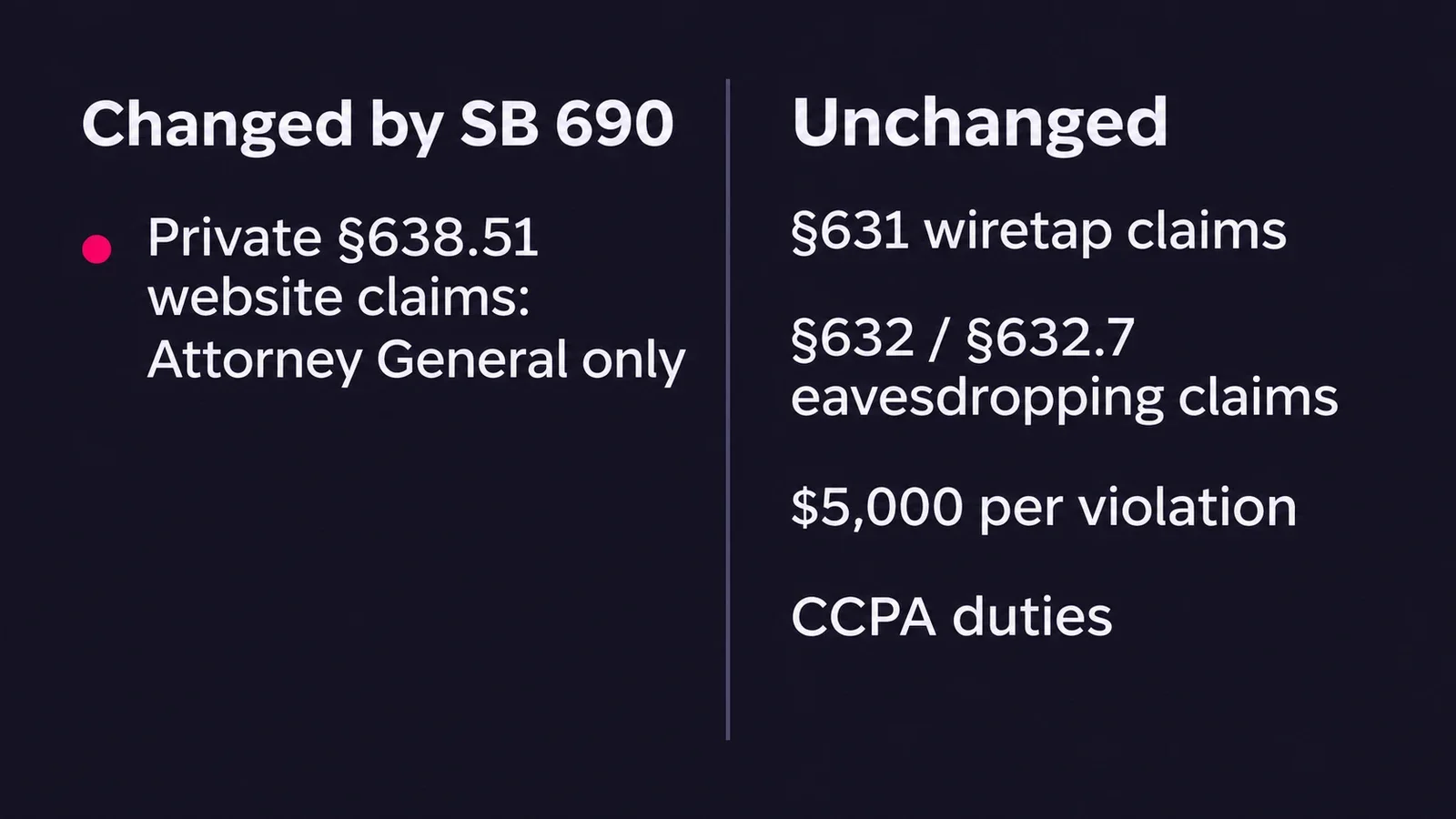
The enacted change is narrow. It amends Penal Code 637.2, the section that lets private parties sue for CIPA violations. Penal Code 638.51 restricts the use of pen registers and trap and trace devices, and plaintiffs had argued that website trackers count as one. Under the chaptered text, that kind of claim now belongs to one party:
"An action against a private actor for a violation of Section 638.51 alleged to arise from conduct occurring on an internet website, online application, or mobile application may be brought under this section only by the Attorney General."
So a private plaintiff can no longer bring a pen-register claim over what your website or app does. The Attorney General still can.
Is SB 690 retroactive?
Partly. The chaptered text says the amendments apply retroactively "to any pending claim in an action commenced within two years before the operative date" of the bill. The bill text doesn't print a separate date. Baker Donelson's post-signing analysis puts it at 1 January 2027. Whether the retroactivity holds up in court, and what happens to appeals already underway, is still unsettled.
The business-purpose exemption is not in the final law
If you read about SB 690 in 2025, you probably saw a "commercial business purpose" exemption. In July 2026 the Assembly amendment "eliminated the commercial business purpose exemption from Sections 631, 632, and 632.7", as the National Law Review reported. Any guide that still describes that exemption is out of date.
What SB 690 left alone
For session replay, this is the part that matters.
Baker Donelson puts it directly: "Claims under § 631 (wiretapping) and §§ 632 and 632.7 (eavesdropping) remain fully available." The statutory damages in Penal Code 637.2(a) are also unchanged in the chaptered text: "Five thousand dollars ($5,000) per violation." The CCPA is a separate statute, and SB 690 doesn't amend it.
Lawyers who follow these cases expect the claims to move rather than stop. In November 2026, Squire Patton Boggs wrote that "Plaintiffs are expected to shift to CIPA's wiretapping and eavesdropping provisions." Courts also disagree about how CIPA applies to website tracking at all. After reviewing four decisions in April 2026, Fisher Phillips concluded that "The takeaway from these four decisions is not reassuring for businesses."
A replay tool records clicks, scrolling, page changes and what visitors do in forms. The remaining wiretap and eavesdropping theories are about capturing the contents of a communication without consent. No setting decides a legal outcome, but how much your replay setup collects, and whether it does what your privacy notice says, is within your control.
Step 1: Check what your replay actually captures
A session replay is rebuilt from page structure and events. It is not a screen video. That means the question is which values reach storage, and the only reliable answer comes from looking at a replay of your own checkout.
Some protection is built in. Revisit never reads the values of file inputs in the browser. Before typed input is stored, it replaces anything typed into password fields and multi-line text boxes with a placeholder. A value typed into an email field (type="email") is cut down to its first two characters and its domain, and a phone field (type="tel") keeps only its last four digits. If you want no trace of those values, the partial masking is not enough, and the test below tells you what remains.
Those rules depend on the field type. Name, street address, city and gift-message fields are usually plain text inputs, and pages such as the order confirmation display personal data as ordinary text. Those are the places to check first:
- The checkout contact, shipping and billing fields.
- Payment fields, if the card form sits directly on your page and not in the payment provider's hosted frame.
- Account pages that show order history, saved addresses or loyalty numbers.
- The order confirmation page, which often prints the full shipping address.
- Contact forms, chat boxes and search fields, where people sometimes type an email or an order number.
- URLs. A query string like
?email=ends up wherever page addresses are logged. If your store puts personal data in URLs, fix that at the source.
Two more settings deserve a look. In the project's Tracking settings, Record Network Activity ("Capture network requests, responses, and API calls") and Record Console Activity are both on by default. They are useful for debugging a failed checkout, but if your checkout or account API responses carry customer details, or your scripts log them to the console, decide whether you need that evidence.
The test: place a test order with obviously fake data, such as the name "Mask Test" and the address "1 Masking Street". Open that session's replay and go through every field and every page you expect to be hidden. Do it again on mobile, because some themes render a different checkout form there. If a value you meant to hide shows up, keep the recorder off that page template until it is fixed, and contact Revisit support with the session.
Keep that fake-order visitor. You will use it again in Step 4.
Don't overcorrect by hiding everything. A r/UXResearch thread complains about a replay tool that "censors almost everything," which leaves recordings you can't learn from. A replay with only the personal values hidden still shows which button the visitor pressed, which step they reached and which error message appeared. Those are the things you need for finding rage clicks and dead clicks and for reviewing checkout replays.
Step 2: Honour Global Privacy Control and Do Not Track, then test it
Global Privacy Control (GPC) is a browser signal meaning "don't sell or share my data." Under the CCPA regulations, 11 CCR §7025, "A business that sells or shares personal information shall process any opt-out preference signal that meets the following requirements as a valid request to opt-out of sale/sharing." Regulators have enforced it. In September 2025 the California Privacy Protection Agency's action against Tractor Supply cited a failure to provide an effective opt-out "including through opt-out preference signals such as Global Privacy Control."
Whether your replay setup counts as selling or sharing depends on your contracts and on how the vendor processes the data. Ask your lawyer that question. The practical choice is often simpler: skip recording visitors who send the signal, and you no longer have to work out whether that recording was a sale.
In Revisit, the setting is called Respect DNT/GPC and it sits in the project's Tracking settings. Its description reads: "Skip recording when a visitor sends Do Not Track (DNT) or Global Privacy Control (GPC)." It is on by default, but anyone with access to the settings can turn it off, so check it. The server applies it per project when the recorder connects. Word your privacy notice carefully: the browser script may still generate identifiers for that visitor, so say that recording is skipped, not that no identifiers or cookies are set.
How to test that your site honours GPC
- Confirm Respect DNT/GPC is on in your project's Tracking settings.
- Open a browser that sends GPC, either through a built-in privacy setting or a GPC extension.
- Open the developer console on your store and type
navigator.globalPrivacyControl. It should returntrue. If it doesn't, the browser isn't sending the signal and the test means nothing yet. - Browse a few pages, add a product to the cart and start checkout.
- Give it a few minutes, then open your sessions list. That visit should not appear.
- Repeat in an ordinary browser window. That visit should appear. Without this second run, you can't tell whether the first one passed or whether recording is simply broken.
This covers replay only. Your ad pixels, chat widget and other tags each need their own handling.
Step 3: Disclose it plainly in your privacy notice
For visitor data captured on your site, Revisit's California Privacy Notice describes Revisit as your service provider or contractor. Your business is the "business" for that data, so your own privacy notice has to explain it. These points are worth covering:
- That you use session replay, what it records (clicks, scrolling, page changes and form interactions, plus network and console activity if those settings are on) and why.
- Who processes it. Revisit is hosted in the EU (Hungary), and a Data Processing Agreement is available.
- Whether you use optional AI analysis of recordings. In Revisit this runs through a third-party model provider and may involve international data transfers.
- How long you keep recordings. Civil Code 1798.100(a)(3) asks for "the length of time the business intends to retain each category of personal information," or, if that is not possible, the criteria used to determine that period.
- How visitors opt out (GPC and Do Not Track are honoured for replay) and how they request access or deletion.
Consent is the harder question. People ask it all the time, for example on r/bigseo: "Do I still need the consent and/or inform visitor that I am using analytics even if no cookie is stored?" The CCPA mostly works on notice and opt-out. The remaining CIPA wiretap theories turn on consent, and whether you need a banner that holds back replay until a visitor agrees is a call for your lawyer.
If you do add one, test that it actually blocks the script. Decline on the banner, browse, then check that no session was recorded. A Shopify thread shows how easily a replay script added to the theme ends up running before the banner has any say.
Step 4: Set retention and handle deletion and access requests
Unless the owner changes it, Revisit keeps recordings indefinitely. The settings panel says so: "Recordings are kept indefinitely by default. Only the project owner can enable automatic deletion." The owner can set a period between 7 and 3650 days. Saving requires ticking a confirmation, because recordings older than the period are then permanently deleted, including ones that already exist.
Base the number on how you actually use recordings. If you review checkout replays weekly and investigate bug reports within a month, years of stored sessions add little evidence and a lot more data to search and delete later. Whatever number you choose, use the same one in your privacy notice.
How long do I have to answer a CCPA deletion request?
Civil Code 1798.130 requires a business to respond "within 45 days of receiving a verifiable consumer request." The period to provide information, correct it or delete it "may be extended once by an additional 45 days when reasonably necessary," as long as the consumer is told about the extension within the first 45 days.
One r/privacy reply describes back-end request handling across vendors as "a manual nightmare." For replay, the hardest part is usually finding the right visitor. Here is a short routine:
- Log the request date and verify the requester through your usual process.
- Find the visitor in Revisit. Recordings are tied to a visitor ID, and the visitor search also looks at a name or email if your store sends them as visitor metadata. If it doesn't, write down how you searched and what you found.
- For an access request, open the visitor and choose Export. Enter the address that should receive it, and Revisit emails a ZIP of that visitor's data (very large exports arrive as a download link).
- For a deletion request, choose Delete and type DELETE to confirm. It permanently removes the visitor's sessions and profile.
- Record the completion date and reply to the requester.
Rehearse this once on the fake-order visitor from Step 1 before a real request arrives. You'll find out whether your store's visitor metadata makes the search work, and the test session gets cleaned up at the same time.
While you're in the settings, add your office and staff IP addresses to IP exclusions so internal visits aren't recorded. Do this after the rehearsal if your test orders come from the office. By default Revisit truncates stored IP addresses (IPv4 to /24, IPv6 to /56), and user-agent storage and location lookup can be configured. Collecting less means less to find and delete later.
What settings can't fix
Some problems sit outside your replay settings.
A letter or lawsuit you've already received needs counsel. SB 690's retroactivity covers only certain pending pen-register claims, and wiretap claims aren't affected at all.
Your other tags have their own exposure. Pixels, chat widgets and ad scripts each need a decision of their own. The CPPA said it bluntly in its May 2025 action against Todd Snyder: "Using a consent management platform doesn't get you off the hook for compliance." Installing a tool is not the same as confirming it blocks what it says it blocks.
The consent strategy for logged-in pages and wiretap theories is a legal design decision, and CIPA is not the only route plaintiffs may take. Fox Rothschild's November 2026 analysis lists federal wiretap, computer access and unfair competition theories among the alternatives. If you also serve EU visitors, our GDPR guide to session replay covers that side.
The checklist, with a pass condition for each item
Copy this into your launch notes. Each row has a test and a result you can see, so nobody has to judge it by feel.
| Check | How to test | Passes when |
|---|---|---|
| Captured fields | Place a fake order and open its replay on desktop and mobile | No value you meant to hide is readable, including plain text fields, account pages and the order confirmation |
| Network and console | Look at the network and console entries recorded with the fake order | You know what they contain and have decided whether to keep both settings on |
| GPC and Do Not Track | Visit in a browser where navigator.globalPrivacyControl returns true, then in an ordinary browser |
The GPC visit is missing from the sessions list and the ordinary visit appears |
| Consent banner (if used) | Decline on the banner, browse, check the sessions list | No session was recorded |
| Privacy notice | Read it next to your project settings | It names session replay, what it records, the processor and EU hosting, any AI analysis, the retention period and how to opt out |
| Retention | The project owner opens Recording retention | A period is saved and matches the number in your notice |
| Requests | Find, export and delete the fake-order visitor | The export email arrives, the visitor and sessions are gone, and the routine is written down for the 45-day window |
| Internal traffic | Browse from the office after adding IP exclusions | The office visit does not appear |
Run the table again after every theme change, checkout change or new app install. Those are the moments when a new form field or script quietly changes what gets recorded.
Again, this is not legal advice and it doesn't guarantee compliance with any law. It is a way to confirm that your replay setup does what your privacy notice says. Once the setup is right, the recordings are still useful for deciding what to fix first.
If you already use Revisit, open your project's Tracking and retention settings and work through the table. If you're setting up replay for the first time, start a 14-day free trial and run the fake-order test before the recorder goes live on your checkout.
Frequently asked questions
Did SB 690 pass?
Yes. California's official bill history shows SB 690 was chaptered on 30 September 2026 as Chapter 976, Statutes of 2026. Post-signing legal analyses give 1 January 2027 as the operative date.
Is SB 690 retroactive?
Partly. The chaptered text applies the change to pending claims in actions filed within two years before the operative date. It covers only private pen-register claims under Penal Code 638.51 over website or app conduct. Whether the retroactivity holds up in court is still open.
Does session replay still carry CIPA risk after SB 690?
SB 690 left the wiretapping (§631) and eavesdropping (§§632, 632.7) provisions and the $5,000 per-violation damages in place, and law firms expect plaintiffs to shift to those theories. How your replay is configured affects what it captures, but it does not settle the legal question. Ask a California privacy lawyer.
Do I need consent for session replay in California?
There is no single answer this article can give you. The CCPA mostly relies on notice and a right to opt out, while the remaining CIPA wiretap theories turn on consent. Whether you should hold back replay until a visitor agrees is a decision to make with a California privacy lawyer. If you do use a consent banner, test that declining actually stops recording.
How do I test that my site honours Global Privacy Control?
Turn on your replay tool's GPC setting. Visit your store in a browser that sends GPC (check that navigator.globalPrivacyControl returns true in the console), browse and start checkout, then confirm no session was recorded. Repeat in an ordinary browser to confirm recording still works there.
How long should I keep session recordings?
The CCPA doesn't set a fixed period, but it requires you to disclose how long you intend to keep each category of personal information, or the criteria you use. Choose a period that matches how you actually use recordings, configure it in your replay tool, and put the same number in your privacy notice.